# Export fonts from a package
> How to export fonts from a package.
Rather than declaring a font as part of an app,
you can declare a font as part of a separate package.
This is a convenient way to share the same font across
several different projects,
or for coders publishing their packages to [pub.dev][].
This recipe uses the following steps:
1. Add a font to a package.
2. Add the package and font to the app.
3. Use the font.
:::note
Check out the [google_fonts][] package for direct access
to almost 1000 open-sourced font families.
:::
## 1. Add a font to a package
To export fonts, place the files in your package's `lib` directory
or one of its subdirectories.
This example uses `lib/fonts` in a Flutter package named `awesome_package`.
Place the package directory next to your app directory.
- awesome_package/
- lib/
- awesome_package.dart
- fonts/
- Raleway-Regular.ttf
- Raleway-Italic.ttf
- pubspec.yaml
## 2. Add the package and fonts to the app
Now you can use the fonts in the package by
updating the `pubspec.yaml` in the *app's* root directory.
:::note
This recipe uses the
[`material_ui`](https://pub.dev/packages/material_ui) package.
If your app doesn't already depend on it,
run `flutter pub add material_ui` from your app's directory.
:::
### Add the package to the app
From your app's directory, add `awesome_package`
using a [path package descriptor][].
```console
$ flutter pub add "awesome_package:{path: ../awesome_package}"
```
[path package descriptor]: https://dart.dev/tools/pub/dependencies#path-package-descriptor
### Declare the font assets
In your app's `pubspec.yaml`, declare the font files from `awesome_package`.
To declare package fonts, prefix the path to the font with
`packages/awesome_package`.
This tells Flutter to look in the `lib` folder
of the package for the font.
```yaml
flutter:
fonts:
- family: Raleway
fonts:
- asset: packages/awesome_package/fonts/Raleway-Regular.ttf
- asset: packages/awesome_package/fonts/Raleway-Italic.ttf
style: italic
```
## 3. Use the font
Use a [`TextStyle`][] to change the appearance of text.
To use package fonts, declare which font you'd like to use and
which package the font belongs to.
```dart
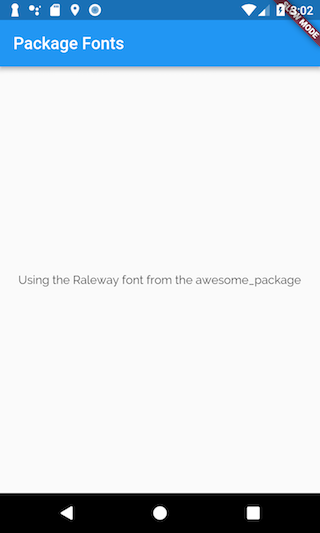
child: Text(
'Using the Raleway font from the awesome_package',
style: TextStyle(fontFamily: 'Raleway'),
),
```
## Complete example
### Fonts
The Raleway and RobotoMono fonts were downloaded from
[Google Fonts][].
### `pubspec.yaml`
```yaml
name: package_fonts
description: An example of how to use package fonts with Flutter
environment:
sdk: ^3.13.0
dependencies:
awesome_package:
path: ../awesome_package
flutter:
sdk: flutter
material_ui: ^1.11.0
dev_dependencies:
flutter_test:
sdk: flutter
flutter:
fonts:
- family: Raleway
fonts:
- asset: packages/awesome_package/fonts/Raleway-Regular.ttf
- asset: packages/awesome_package/fonts/Raleway-Italic.ttf
style: italic
uses-material-design: true
```
### `main.dart`
```dart
import 'package:material_ui/material_ui.dart';
void main() => runApp(const MyApp());
class MyApp extends StatelessWidget {
const MyApp({super.key});
@override
Widget build(BuildContext context) {
return const MaterialApp(title: 'Package Fonts', home: MyHomePage());
}
}
class MyHomePage extends StatelessWidget {
const MyHomePage({super.key});
@override
Widget build(BuildContext context) {
return Scaffold(
// The AppBar uses the app-default font.
appBar: AppBar(title: const Text('Package Fonts')),
body: const Center(
// This Text widget uses the Raleway font.
child: Text(
'Using the Raleway font from the awesome_package',
style: TextStyle(fontFamily: 'Raleway'),
),
),
);
}
}
```
{:.site-mobile-screenshot}
[Google Fonts]: https://fonts.google.com
[google_fonts]: https://pub.dev/packages/google_fonts
[pub.dev]: https://pub.dev
[`TextStyle`]: https://api.flutter.dev/flutter/painting/TextStyle-class.html